How to build a custom (gaming) PC in Nepal under tight budget

Note: At the end I decided not to build this PC and instead go for a laptop because of the following reasons:
-
PC does not have Wi-FI. Either I pay premium(8000 extra) for motherboard, or I get a cheap Wi-Fi dongle which will probably be unreliable.
-
No bluetooth with budget motherboard. Another dongle required for convenience.
-
No OEM windows 11. Have to tolerate Linux desktop environment or use cracked Windows 11. Not my thing (although I know Linux pretty well).
-
If I keep rich components, building a PC is really expensive.
Take this build(as of date Kartik 9,2083):
i5-14400 CPu=29,500
MSI B760M P DDR4=21,500
KINGSTON Fury Beast 16GBx2 DDR4 3200MHz=40,000
Huntkey GX760A case=8,500
MSI 750 Watt 80+ Gold PSU=15,000
ADATA 512GB NVME SSD=19,500
Deep cool dual fan liquid cooler=8500
This is already 1,42,500.
Then, I need an UPS(because power cuts and no battery is present in desktop. I need an UPS with graceful shutdown feature that auto detects power cuts.), wi-fi dongle(because a motherboard with Wi-Fi costs significantly higher), bluetooth dongle, speaker(because my bluetooth speaker will not work with this motherboard based on my research), monitor.
Note that I am not even getting a dedicated GPU at this price with this laptop. With all those accessories added, the cost of the build will be:
1,95,500.
Compare this to the following laptop:
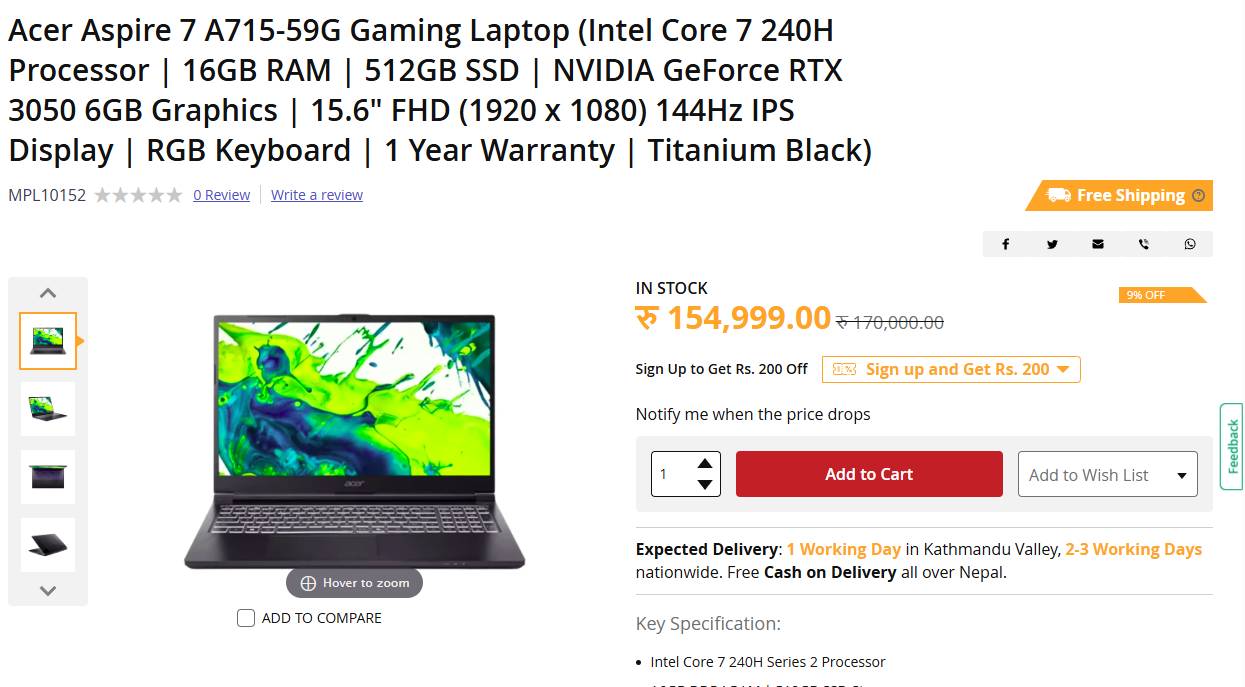
I asked the seller and adding another 16GB DDR4 RAM(for 32GB RAM total) will take its price to just 1,75,000. I bet I can negotiate if I research a bit more. However I will still publish this writeup because I have already written it. I do not think anyone needs the review of that laptop because it is well-reviewed(I mean it has many reviews, not just good reviews) laptop already.
Information regarding building a PC in Nepal is not readily available. You might think $990=1,50,000 lakh rupees, so I(who is smart) will search for a PC under $990 in google hoping that American reviewers or PCPartPicker might have put some build choices online. And you will be completely wrong if you do so. This is Nepal. Wake up! Not America, not even India.
The cost estimation that you are thinking of is totally inaccurate. There will be lots of hidden factors that pump the price of PC up in Nepal. I cannot say for sure around the Indian borders, but in Kathmandu, PC building is not cheap. It is damn damn expensive. And if you are not clever enough to research properly, you might even get scammed by the shopkeeper in various ways. I will say more on this later on. Keep reading.
Even I still do not know why PC components prices in Nepal are so variable. Here are my few guesses:
- Import tax, VAT and stuffs like that.
- The prices of components are changing too frequently. And all online shops are not updating the prices. So, you will see “16 GB DDR4 RAM for 9000 rupees” at one place and same RAM for 40,0000 Rupees in another place.
- Some could be just fooling their customers. Very sad for them. Because they think business is an one-time thing. Customer comes and never comes back. That is not how things work. Word of Mouth in the digital era can spread more quickly than they realize. You cannot keep fooling everyone all the times.
- Some are official distributors/re-sellers and that is why the prices might have leaned towards the expensive side. They are charging premium for their official-ness, i.e., the trust.
Fix your budget
Part of me believes that your needs should dictate your budget. But let’s be realistic. Budget dictates our needs.
My budget in this gruesome tech market is 1,50,000 Rupees. It is not a lot in this tech economy. As someone building with an integrated GPU processor, I felt that RAM(even DDR4) prices eat a lot of budget.
Why am I building a PC
I am not just telling my journal to you by saying why am I building a PC. You should decide what you’re exactly going to do each day in your PC. You should not be saying ki “alikati game ni khelchu, alikati coding ni garchu, alikati video editing ni garchu, alikati animation ni garchu”. Fix your purpose. Honestly, this might even give you existential crisis if you are an wandering soul who is aimlessly wandering here and there. But move forward by answering that question. You cannot build a budget PC that can do everything. You will have to spend more than what is worth for yourself in the long run if you do so. So, fix your target.
I will discuss my goals with the PC below.
- Intermediate DevOps learnings and homelab:
I am doing devops labs. I have courses that are waiting for me to view and complete in Udemy and probably more on my wishlist.
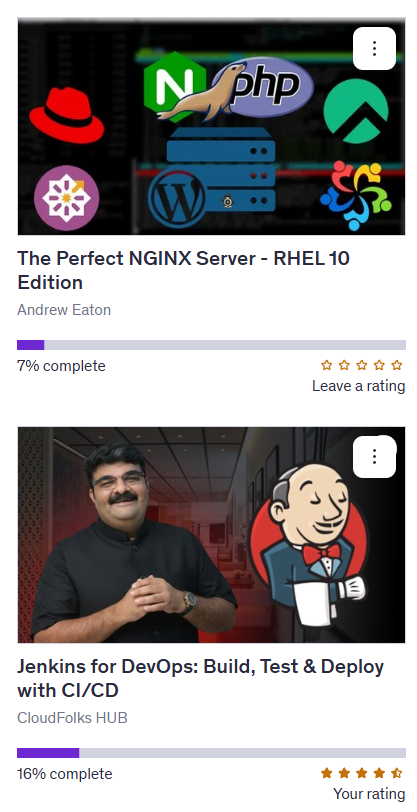
I am building a series about 45 days of DevOps. You can read more about it below:
https://berojgarengineer.com/blog/45-days-of-devops/
So I need a PC that can handle many Virtual Machines.
Do not get me wrong. I already have 2 laptops. In total, I have 20GB RAM and 4 cores/8 threads CPU. But the problem is that it is not an unified machine.
One laptop I use for browsing the web, and another I have installed proxmox VE in it.
You can read more about my initial homelab experience in the following blog:
I am building this PC because I want to deploy a lot of things not for my uses but to learn the deployment. I want to try kubernetes at a more advanced level.
-
Upskill my coding skills in any programming language. I am familiar with Java and Spring Boot, so I think I will continue with it.
-
Learn “AI Engineering” by reading the book by Chip Huyen. On the way, I will also dive into udemy courses that actually tutor me to implement stuffs because this book is more of a concept oriented book based on my research.
Honestly, I feel like I did the big talk earlier. It looks like even I am not exactly clear why I need this PC for!
Second Hand
I do not recommend second hand. End of the story. Obviously unless you are getting it from someone you know already and trust already.
I do not recommend getting second hand electronics from shopkeepers or strangers in Nepal. The reason behind this is that Nepalese are getting very hard to trust these days.
Plus for a fact I know that many people in Nepal use their electronics to the ultimate limit before even considering of selling it on second hand. We are not privileged enough to throw new tech every couple of years and get a latest one. We use things till it can be used. And sell when it cannot be used anymore. And even that we list them for hefty pries in Hamrobazaar or Facebook Marketplace because we believe their worth is more than what actually it is for the other person.
Components
Now let’s dive into components. Since my main needs are virtual machines, I decided that I will need lots of cores and lots of RAM. But based on my budget, I could only get 16 threads in a processor with integrated GPU and 32GB DDR4 RAM.
CPU: The CPU I picked is i5-14400. It has 10 cores, 16 threads.
RAM: 32GB RAM is minimum for me. Since 32GB DDR5 costs NPR 70,000, the obvious decision was to go with DDR4 RAM which costs nearly NPR 40,000.
Motherboard: I had a seasoned brand motherboard in my mind. There was not huge fluctuation in prices of motherboard.
GPU: I do not need a discrete/dedicated GPU. I choose a processor with integrated GPU. This is a compromise that I had to make.
Storage: 512GB NVME ssd is what I have picked. Since SATA and NVME SSDs prices are comparable, I decided to go with NVME as it is a newer generation. There were generations inside NVME as well. Gen 3, Gen 4 is what I heard when I asked for quotations from shops. Remember that since SSDs are also getting very expensive, many PC build shops are giving pull-out(used) SSDs for cheaper rates or some non-reputed Chinese brands. Do not fall for that trap. A genuine seasoned brand’s 512GB SSD will cost nearly NPR 20,000.
PSU: Power Supply Unit was the component that I felt many sellers were compromising. They were putting cheap PSUs in the PC build(so that the build pricing becomes attractive). A good brand modular PSU costs NPR 15,000 and onwards.
Quotations
I cannot mention the exact shop names that gave me quotation for various obvious reasons. But I will anonymously list the various quotations that I got from shops. This is as of Kartik 9,2083. Note that the prices are changing too frequently and will keep on changing like that for 2-3 years at least(based on what I have read).
Quotation from Shop “A”
| Item | Qty | Unit Price (NPR) | Total (NPR) |
|---|---|---|---|
| Casing Ant Sports Ice 410TG Black Gaming | 1 | 8,750.00 | 8,750.00 |
| Power Supply 600W Thermaltake | 1 | 7,200.00 | 7,200.00 |
| Motherboard MSI B760-MP DDR4 | 1 | 19,800.00 | 19,800.00 |
| CPU Intel Core i5-14400 | 1 | 31,200.00 | 31,200.00 |
| CPU Cooler Cooler Master T400K | 1 | 4,100.00 | 4,100.00 |
| RAM 32GB DDR4 3200MHz, Heatsink 16×2 | 1 | 36,200.00 | 36,200.00 |
| NVMe 512GB Gen 4 | 1 | 11,100.00 | 11,100.00 |
| Freebies: Keyboard, Mouse, Mousepad | 1 | 0.00 | 0.00 |
| Subtotal | 118,350.00 | ||
| Grand Total | 118,350.00 |
They indeed provided a good build. But no brand SSD, no brand RAM means there are compromises made in these components.
Quotation from Shop “B”
I5 14400 @29000
Asrock B760M PG Riptide @24500
32GB DDR4 Ram @45000
Acegeek Qube Casing with 750w 80+ Bronze psu @13500
Coolermaster T20 cooler @2000
512Gb Nvme ssd @12500
1TB Nvme ssd gen3x4 @20000
Note how cleverly they do not mention the brand of RAM and SSD which are the most expensive components. No surprises, they were using pulled out SSD. RAM was also from newer brand but it was good enough.
Quotation from Shop “C”
| Item | Description | Qty | Rate | Amount |
|---|---|---|---|---|
| CPU | INTEL CORE I5-14TH GEN | 1 | 29500 | 29500 |
| BOARD | MSI B760M P DDR4 | 1 | 21500 | 21500 |
| RAM | KINGSTON FURY BEAST 16GB 3200MH | 2 | 20000 | 40000 |
| CASING | HUNTKEY GX760A | 1 | 8500 | 8500 |
| PSU | HUNTKEY 600W | 1 | 3500 | 3500 |
| SSD | 512GB NVME | 1 | 14500 | 14500 |
| FAN | DEEP COOL DUAL FAN LIQUID COOLER | 1 | 8500 | 8500 |
| MONITOR | BENQ GW2490C 24” | 1 | 23000 | 23000 |
| GRAPHICS CARD | MSI RTX 3050 6GB | 1 | 55000 | 55000 |
| TOTAL | 204000 |
Since this was the seller I used to go frequently, I contacted them repeatedly to get more information. The build that I told at the start was based on communication with this seller.
Conclusion
This is a strange post. I had a sudden realization(which should have been obvious from the start) that building a PC by assembling various components will be more expensive than buying low power and mass produced acer laptops. Whatever! The reason I fell for PC build was I heard since a long time that building a PC gets better value for money compared to a laptop or mini PC.
I have decided to buy a laptop with 16GB DDR4 RAM, put another 16GB DDR4 RAM stick into it and do whatever I said at the start.